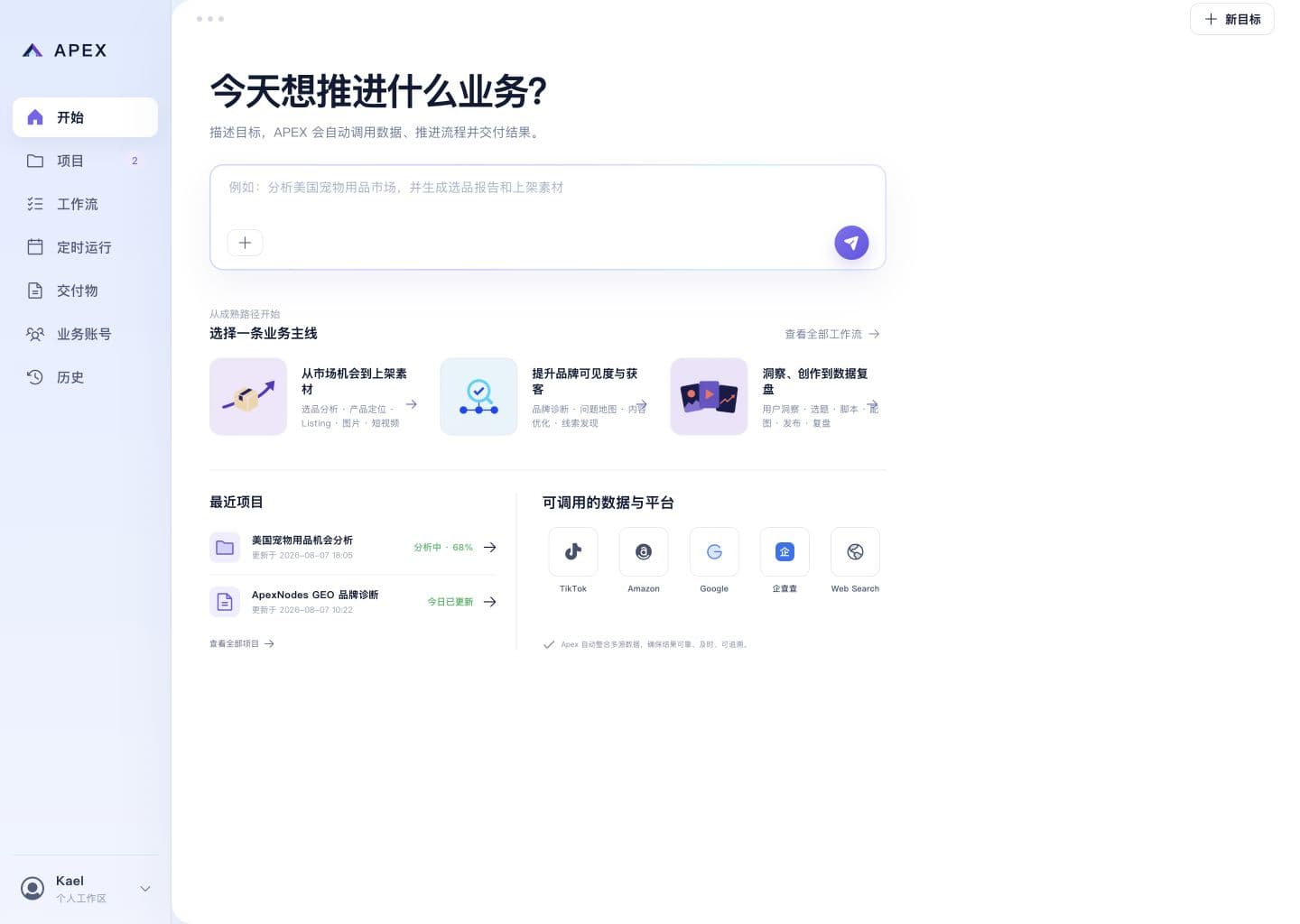






Let AI draft the first version
Send a request and AI researches, analyzes and drafts a plan first, producing a version you can edit and reuse, with routine tasks running automatically every day.
Download the desktop app, or use the cloud version right in your browser.
Works in WeChat, Feishu, DingTalk and other chat entries, plus WeCom and QQ.
WeChat
Feishu
DingTalk
WeCom
QQ
Always on in the cloud — your AI assistant stays online even when your computer is off.
Not just a one-off answer. Routine tasks gradually become reusable templates.
Generating one version
One version readyUser sent
Analyze why this short video took off, then write me 3 scripts.
AI made a first version
Sources: links you send, public web pages, and trends from Douyin / Xiaohongshu / Kuaishou / Bilibili / WeChat Channels / WeChat Official Accounts.
Four capabilities, end to end
From delivering a first version of the result to multi-channel access, scheduled automation, and an on-demand capability shelf.
Deliver a first result
Send a request, then the AI researches, analyzes, and produces an editable, reusable first version.
Multi-channel access
Use it right inside WeChat, Feishu, DingTalk, WeCom, and QQ.
Scheduled automation
Turn routine tasks into schedules that run daily and report back on their own.
Capability shelf
Pick capabilities off the shelf for the job at hand. Ready to use, no setup.
What small jobs can you hand over first?
Pick a common work type and let AI research, organize, compare, then hand back a first version.
E-commerce and cross-border
First judge whether a product is worth testing
Sends: Is this gadget worth selling?
First pass: Price bands + top complaints + a sourcing call
Content and social
First break down topics and angles
Sends: How do I copy this hit?
First pass: Hook + selling-point structure + 3 script titles
Marketing and growth
First sort campaigns and leads
Sends: Sort out the campaign audience and assets
First pass: 3 audiences + asset list + follow-up points
Office and projects
First organize documents and actions
Sends: Turn these meeting notes into decisions + tasks
First pass: 5 decisions + tasks + timed reminders
Professional services
First clarify client questions
Sends: Prep replies to these client questions
First pass: Q&A + sources + a draft of the key points
Sales and support
First sort customer and after-sales issues
Sends: Lay out the follow-up for this client
First pass: History + 3 follow-up points + a script
It can research, organize, compare, and run on schedule
It can read webpages and files, understand images, and send results on a schedule: useful for repeated small jobs.
Web research
Research public information around a question, then organize sources and conclusions.
Material handling
Turn documents, spreadsheets, and long text into key points, lists, and next steps.
Image understanding
Read product images, screenshots, and reference images to extract key information.
Scheduled reports
Run daily or weekly and send you the result.
Always on in the cloud
Your AI assistant runs in the cloud: online even when your computer is off or locked, ready on WeChat and Feishu anytime, never tying up your machine.
Make one version free. Upgrade when it helps.
Free is for trying one full run; upgrade when you need to use it repeatedly and turn tasks into reusable templates.
Free
For trying one real small job first.
Advanced is coming soon. You can reserve access now.
- 1 AI assistants
- About 500 usage credits
- Pay as you go after included usage
- Daily reminders and result delivery
Fast
For individuals or small teams keeping one AI assistant running steadily.
Advanced is coming soon. You can reserve access now.
- 2 AI assistants
- About 1500 usage credits
- Pay as you go after included usage
- Daily reminders and result delivery
Advanced
For businesses that need multiple AI assistants, team reminders, and steadier usage.
Advanced is coming soon. You can reserve access now.
- 3 AI assistants
- About 4500 usage credits
- Pay as you go after included usage
- Daily reminders and result delivery
Three steps to let AI make a first version
Choose a type of work, choose a assistant, and assign the first job.
Make a first version freeChoose work
Start from common jobs like product research, support, or document organizing.
Find a assistant
Pick a assistant that fits your scenario.
Start doing
Assign the first job; results appear on the web and in Feishu.
First organize selling points, group-order copy, and messages to send.
Douyin / Xiaohongshu / Kuaishou / Bilibili / WeChat Channels / WeChat Official Accounts: break topics down, organize selling points, and draft content.
First research the market, compare competitors, and organize a product-selection view.
Frequently Asked Questions
How is it different from general AI assistants?
General chat assistants are good for asking questions anytime. APEX focuses on making a first version of a recurring small job: research it, organize it, compare it, and keep the result in your workspace.
Can it replace people?
No. It is best for first-pass screening, organizing, and drafting so you can reduce trial cost. Important decisions should still be confirmed by people.
Do I need technical setup?
No. Start from the work you want done, and the system prepares common capabilities for you.
Can I use the result directly?
Simple copy and organized materials may be usable first. For prices, policies, performance promises, and important decisions, check the sources and boundaries manually.
What jobs is it good for?
Researching information, organizing materials, comparing competitors, summarizing documents, preparing support and sales replies, and sending recurring results.
Do I have to use one fixed entrance?
You can view results on the web and assign work or receive updates in Feishu. More entrances can be added later.